Framer for Photographers: An Honest 2026 Review
Most reviews of Framer for photographers fall into the same trap. They list ten beautiful templates, call the design quality unmatched, drop in an affiliate link, and never tell you whether you should actually use it. This one is different. Framer is not the default website builder for photographers in 2026, and pretending otherwise does you no favours. Showit owns wedding photography. Squarespace owns the photographers who want everything in one place. Framer sits in a third lane that suits a specific kind of photographer, and the question worth answering is whether you are that photographer.
This review of Framer for photographers covers where it wins, where it falls short, what it actually costs once you factor in the gotchas, and how it stacks up against the platforms photographers usually choose. By the end you will know whether Framer for photographers is the right call for your work, or whether your money goes further somewhere else.
The Short Version
Framer for photographers is the strongest choice for design-led photographers who want their site to feel like a creative statement, with full control over animations, typography, and image presentation. It is not the right call for wedding photographers, who are better served by Showit and its WordPress blog integration, or for photographers who need built-in print sales and client proofing, where Squarespace plus Pixieset is the cleaner setup. Framer’s Basic plan at $10 per month caps sites at 30 pages and one CMS collection, which becomes restrictive fast once a portfolio and blog share the same site.
Where Framer for Photographers Genuinely Wins
The case for Framer for photographers starts with what photographers actually need a website to do, which is to make the work feel like the work. Galleries should breathe. Transitions should feel intentional. Loading should feel instant. On all three counts, Framer for photographers is one of the strongest options on the market in 2026.
Image optimisation under the hood is one place where Framer for photographers genuinely outperforms expectations. Every upload is automatically converted to AVIF, generates a srcset with four sizes (512, 1024, 2048, and 4096 pixels), and lets the browser pick the right size for the device. Combine that with Framer’s traffic-aware pre-rendering and global CDN, and gallery pages load fast even when they are heavy with high-resolution images. For a discipline where slow loading is a quiet conversion killer, this matters more than most photographers realise.
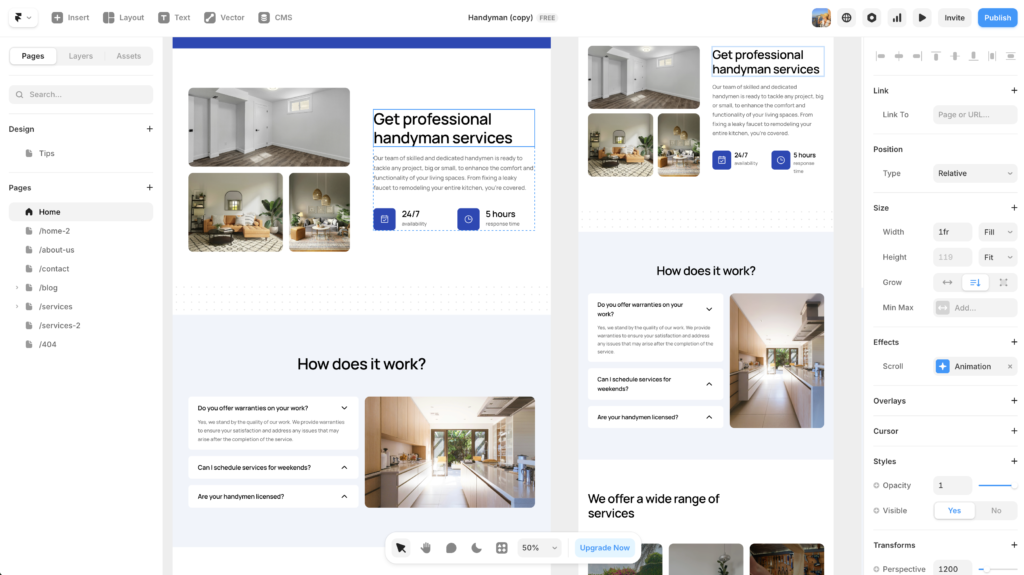
The other genuine strength is design control. Framer gives you the kind of granular control over hover states, scroll-triggered animations, and gallery transitions that Squarespace and Showit simply cannot match. If your style depends on motion, on the way a thumbnail expands into a full image, or on the editorial pacing of a long-form case study, Framer is built to support that. The newer template generation, including Captured and Aperture, uses Framer’s native lightbox component with unlimited image uploads, which closes a gap that existed in earlier reviews.
For the photographer whose site needs to function as part of their creative portfolio rather than just a contact form with pictures attached, Framer for photographers offers real, tangible advantages over the alternatives.
The Honest Limitations of Framer for Photographers
Now the harder part. Framer for photographers is missing several things photographers tend to assume are baseline, and the pricing structure has a quirk that catches people out.
The Basic plan at $10 per month sounds cheap until you read what it includes. You get 30 pages and one CMS collection. Framer counts every CMS item as a page, which means 30 portfolio entries is your hard ceiling before you even add a home page, about page, or contact page. If you want a blog alongside your portfolio, you cannot do it on Basic, because Basic only allows one CMS collection total. The next tier, Pro, costs $30 per month and is where most working photographers using Framer for photographers will actually land.
The free plan is more generous on raw CMS capacity (10 collections, 1,000 pages) but caps you at 1,000 visitors per month and forces a Framer subdomain with branding. It is fine for testing, not for a live photography business.
Beyond pricing, there are three structural limitations to know about before you commit.
No Native Print Sales or Client Galleries
Framer has no built-in ecommerce. If you want to sell prints, you have two options. The first is a third-party plugin like FramerFlo at $20 per month, which adds Stripe, PayPal, and Square checkout for digital and physical products. The second is to keep using a dedicated photographer platform like Pixieset for client galleries and print sales, and embed those galleries into your Framer site. Neither option is as clean as Squarespace’s integrated commerce or Pixieset used as your full stack. If selling prints or running client proofing is core to your business, Framer for photographers will always feel like a workaround.
No Code Export, No Easy Exit
Framer does not let you export your site as HTML and CSS. Once your site is built on Framer, you stay on Framer or rebuild from scratch elsewhere. For a designer this is a familiar trade, but photographers who have spent years building SEO on a WordPress blog or Showit site need to think carefully about platform lock-in before migrating.
Basic CMS, Light Integrations
The CMS works for blog posts and portfolio collections. It does not have the depth of WordPress, the photographer-focused integrations of Showit, or the all-in-one tooling of Squarespace. For a working photographer who relies on blog content for SEO, the gap between Framer for photographers and the Showit plus WordPress combination is real, and Showit’s WordPress integration remains the strongest blogging setup in the photography category.
Where Framer wins on creative control, it loses on the practical infrastructure most photography businesses actually run on.
Framer vs Squarespace for Photographers: How They Compare
Most photographers evaluating Framer are also looking at Squarespace, and rightly so. The two platforms solve different problems and the right answer depends on what you need your website to do. Here is how the comparison actually breaks down for photographers in 2026.
| Feature | Framer | Squarespace |
|---|---|---|
| Design control | Total. Figma-style canvas, custom animations, hover states | Strong template-led design, limited custom motion |
| Gallery blocks | Built per project, unlimited lightbox images, more setup required | Pre-built grid, carousel, slideshow blocks with image focal points |
| Print and digital sales | Requires plugin or Pixieset embed | Native ecommerce, integrated checkout |
| Client proofing | Not native, integrate Pixieset | Not native, integrate Pixieset |
| Blog setup | Native CMS, but Pro plan needed for blog plus portfolio | Native blog, included on all paid plans |
| Starting price | $10/mo Basic, $30/mo Pro | $16/mo Personal, $23/mo Business |
| Best for | Editorial, fashion, design-led photographers | All-in-one photographer business sites |
The pattern is clear. Squarespace is the safer one-stop platform, with built-in tools that mean you spend less time building infrastructure. Framer for photographers is the better choice when design control is the priority and ecommerce sits outside the website itself.
Where Showit Still Wins Over Framer for Photographers
For wedding photographers especially, the conversation is not really Framer vs Squarespace. It is Framer for photographers vs Showit. Showit has built an entire template designer ecosystem around photographers (Fjor Avenue, Buffalo Collective, Studio Wildlight, Superhero Design) and pairs every site with a native WordPress blog. That combination is hard to beat for SEO, because WordPress remains the strongest blogging platform on the market.
If your business depends on ranking blog content (wedding recaps, location guides, “what to wear” posts), the Showit and WordPress combination still has the edge. Framer’s blog works, but it does not give you the depth of plugins, schema controls, and ranking history that a mature WordPress blog provides. For wedding photographers who already invest in long-form blog content, Showit remains the more defensible choice in 2026.
That said, Framer is the easier system to design in. It feels more professional, allows for more advanced custom features, and produces sites that look closer to a studio brand than a template purchase. If your wedding photography brand leans editorial rather than romantic, or if blog SEO is not how you find clients, Framer can absolutely compete.
The Best Framer Templates for Photographers in 2026
Framer’s template library has grown significantly in 2025 and 2026, and several options now hold up against the photography-specific templates on Showit and Squarespace. These are the ones worth considering if you choose Framer for photographers.
| Template | Price | Best for |
|---|---|---|
| Aperture | $129 | Gallery-first portfolio with strong SEO defaults and 8 pre-built pages |
| Captured | Paid | Event and portrait photographers needing unlimited lightbox uploads |
| Photographer | Free | Photographers testing the platform before committing to a paid template |
| Blinked | Paid | Wedding and event photographers focused on bookings |
| Lumos | Paid | Portrait photographers wanting an editorial feel |
| Gualdi | Paid | High-volume photographers organising large portfolios across categories |
Across the board, the templates that hold up best are the ones built specifically around gallery navigation and image hierarchy, rather than design-led templates retrofitted for photography. Try Framer free and load the Photographer template first if you want to feel the platform before paying for anything.
What Framer for Photographers Actually Costs in 2026
The marketing price and the real price are not the same. For most working photographers, here is what the actual yearly cost looks like.
On the Basic plan at $10 per month annual ($120/year), you get 30 pages, one CMS collection, custom domain, and the Framer badge removed. This is enough for a single-page portfolio site without a blog. If your portfolio runs more than 30 entries or you want a blog, you need to upgrade.
On the Pro plan at $30 per month annual ($360/year), you get 300 pages, 10 CMS collections, AI design tools, and staging. This is where most photographers with a real working site will end up. Add a premium template at $129 once, and the first-year cost is around $489 before any ecommerce plugin.
If you also want to sell prints directly from your site, add another $240 per year for FramerFlo. For comparison, Showit Advanced sits at $34 per month ($408/year) including the WordPress blog plan and integrated ecommerce, and Squarespace Business is $23 per month ($276/year) with native commerce included. Framer is not as cheap as it looks once you account for the Pro plan upgrade and any ecommerce needs, but it still lands in a competitive range.
The price advantage is real on Basic. The price advantage shrinks fast on Pro.
Who Should Choose Framer for Photographers
This is the part most reviews skip. Framer for photographers is not for every photographer, and pretending otherwise just sets people up to switch platforms in eighteen months. Based on the research and the technical realities of the platform in 2026, here is the honest breakdown.
Choose Framer for photographers if: your work is design-led or editorial, you want full control over animations and gallery interactions, you do not sell prints directly through your website, your blog (if you have one) is more of a journal than an SEO engine, and you care about the site feeling distinct from every other photographer using the same template marketplace.
Choose Showit instead if: you are a wedding or portrait photographer, blog content drives your bookings, you want access to the deep ecosystem of photographer-specific template designers, and the WordPress integration matters to your SEO strategy.
Choose Squarespace instead if: you want one platform to handle galleries, blogging, scheduling, ecommerce, and email in a single subscription, and you are willing to trade some design control for less infrastructure work.
The right tool is the one that supports the way your photography business actually makes money, not the one with the prettiest landing page demo.
Frequently Asked Questions About Framer for Photographers
Is Framer good for photographers in 2026?
Framer is genuinely good for design-led photographers who want their site to function as a creative portfolio with full motion and layout control. It is less good for wedding photographers who rely on blog SEO or photographers who sell prints directly from their website. For the right photographer Framer is excellent. For others, Showit or Squarespace will serve you better.
Can you sell prints on Framer?
Not natively. Framer has no built-in ecommerce. To sell prints you need either a third-party plugin like FramerFlo (around $20 per month) or you keep selling through a dedicated photographer platform like Pixieset and embed the gallery into your Framer site. If selling prints is central to your business, this is friction you should factor in.
How does Framer handle a photography blog?
Framer has a built-in CMS that works fine for blog posts. The catch is plan limits. The Basic plan allows only one CMS collection, so if your portfolio uses the CMS you cannot also have a blog without upgrading to the Pro plan at $30 per month. For photographers running serious blog SEO, the combination of Showit and WordPress remains a stronger setup than Framer for photographers running on the native CMS.
Is Framer for photographers cheaper than Showit?
On entry pricing, yes. Framer Basic at $10 per month is cheaper than Showit’s starting plan. Once you upgrade to Framer Pro at $30 per month, which most working photographers will need for a portfolio plus blog, the cost is close to Showit Advanced. Add a premium template and the first-year totals are comparable. Price alone is not a strong reason to choose one over the other.
Can I move my Framer site to another platform later?
No. Framer does not allow you to export your site as HTML and CSS. If you decide to leave Framer, you rebuild from scratch on the new platform. For photographers with years of SEO history on a current site, this is worth considering before migrating.
The Verdict on Framer for Photographers in 2026
Framer for photographers is the right choice for a specific kind of photographer, not for every photographer. If your work leans editorial, fashion, or design-forward, and your website needs to function as part of your creative expression rather than just a contact funnel, Framer is one of the strongest platforms available in 2026. The image optimisation is excellent, the design control is unmatched, and the newer photography templates close most of the gallery-feature gap that used to exist.
For wedding photographers, photographers who sell prints, or anyone running serious blog SEO, the better options remain Showit or Squarespace. Not because Framer is bad, but because those platforms are built around the specific needs photography businesses tend to have.
If Framer is the right fit, the best move is to start on the free plan, test the platform with the Photographer template, and only upgrade once you know the platform supports your workflow. Try Framer free and see how it feels before you commit to anything paid.
For a broader view of what else is out there, our roundup of the best website builders for photographers covers the full landscape, and our full Framer AI review goes deeper on the platform itself.
This article contains affiliate links. If you purchase through our links we may earn a small commission at no extra cost to you. We only recommend tools we have personally used or thoroughly researched.